CQ Memory — Knowledge Graphs
CQ Memory is CitadelQuest's powerful knowledge management system. It transforms unstructured content — documents, web pages, conversations — into interactive 3D knowledge graphs that your Spirits can use for persistent, contextual memory.
Key Concepts
Memory Pack (.cqmpack)
A standalone knowledge graph stored as a portable SQLite database file. Each pack contains:
- Nodes — individual pieces of knowledge (facts, insights, preferences, thoughts)
- Relationships — typed connections between nodes (relates to, contradicts, reinforces, etc.)
- Tags — flexible labels for filtering and search
- Source content — the original documents that knowledge was extracted from
Packs are fully self-contained and portable — they can be shared between users and Citadels.
Memory Library (.cqmlib)
A collection that groups multiple Memory Packs together. Libraries help you organize related knowledge:
- Enable/disable individual packs
- Set priorities for which packs are searched first
- Tag packs for easy categorization
Memory Node
A single unit of knowledge. Each node has:
- Content — the actual information
- Summary — short description shown on the graph
- Category — knowledge, fact, preference, thought, conversation, or internet
- Importance — how relevant this memory is (decays over time if not accessed)
- Source tracking — where this memory came from
Relationships
Connections between nodes, each with a type:
| Type |
Meaning |
Visual |
| RELATES_TO |
General semantic connection |
Blue edge |
| REINFORCES |
Supporting/confirming information |
Green edge |
| CONTRADICTS |
Conflicting information |
Red edge |
| PART_OF |
Hierarchical parent-child |
White/Grey edge |
Memory Explorer
Route: /memory
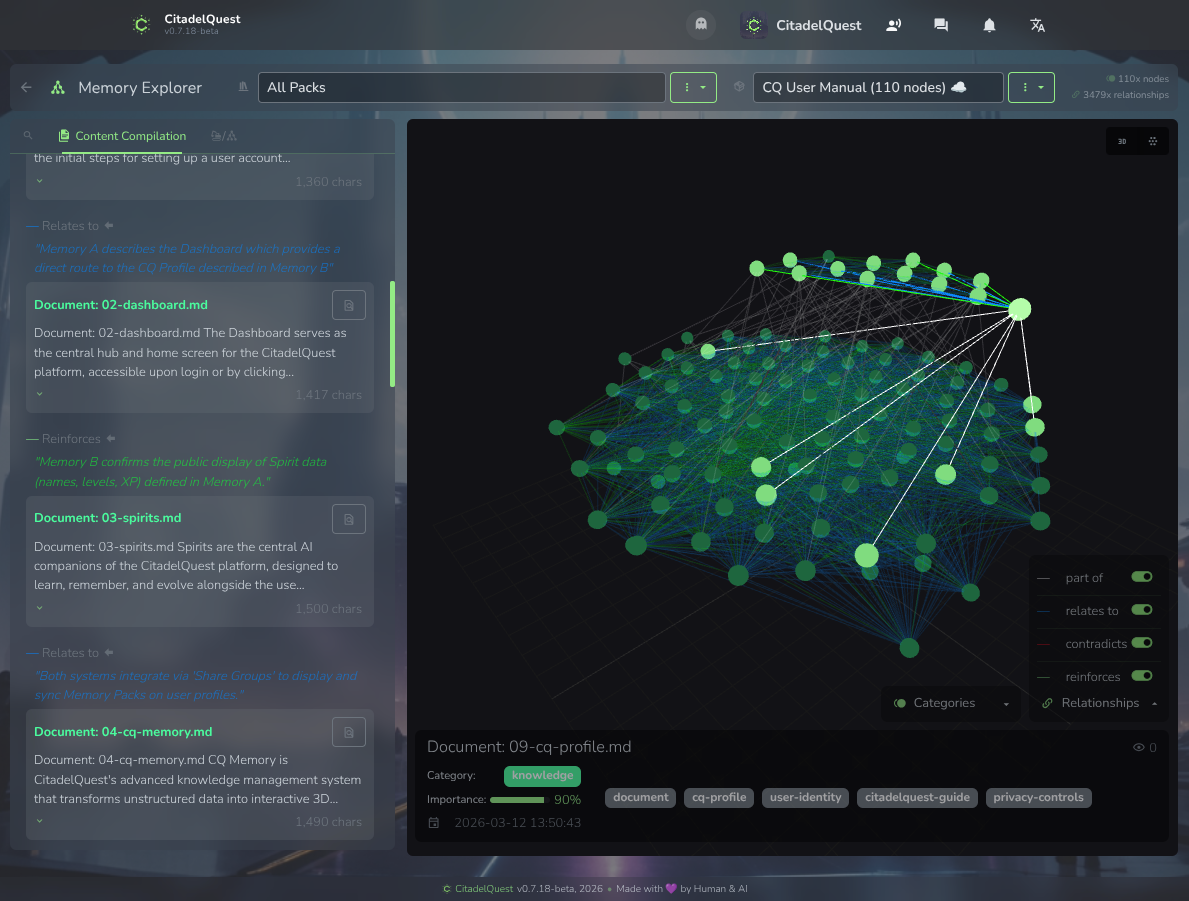
The Memory Explorer is the main interface for viewing and managing your knowledge graphs.
Layout
- Left sidebar — Node list with search, source document sections, extract and analyze tools
- Center — Interactive 3D graph visualization
- Top bar — Library selector, Pack selector, info
3D Graph Visualization
The centerpiece of Memory Explorer — an interactive 3D force-directed graph rendered with Three.js:
- Nodes appear as colored spheres (color = category)
- Edges connect related nodes (color = relationship type)
- Click a node to see its details (content, category, importance, tags, source)
- Hover over a node to highlight its connections and show the node's title
- Scroll to zoom, drag to rotate, right-drag to pan
- Click+Ctrl zoom to node + set camera center of rotation
- Delete key press to show confirm window, delete node and its children
- Node size reflects importance
Library Selector
The dropdown at the top lets you switch between:
- All Packs — shows every
.cqmpack file in your project
- Specific libraries — shows only packs in that library
- When viewing a Spirit's memory (
/memory?spirit={id}), only that Spirit's library is shown
Pack Selector
Next to the library selector, choose which pack to visualize. Shows:
- Pack name
- Node count badge
- Relationship count badge
- Dropdown for Pack management (Add/Remove from Library, Show details with AI usage stats, Delete)
Creating a New Pack
- Click the + button next to the pack selector
- Enter a name for your new pack
- The pack is created and automatically added to the selected library
Creating a New Library
- Click the + button next to the library selector
- Enter a name and optional description
- The library is created at the default location
Memory Extraction
The Extract Panel lets you add knowledge from various sources into a pack.
Source Types
File
Upload or select a file from your File Browser. Supported: text documents, PDFs, code files, and more.
URL
Enter a web page URL. CitadelQuest fetches the content and extracts knowledge from it.
Text
Paste any text directly. Useful for quick notes, copied content, or manual input.
Conversation
Select a Spirit and one of its conversations. The conversation transcript is extracted into structured knowledge.
Extraction Process
- Select your source type and provide the content
- Click Start Extraction
- Watch the 3D graph update in real-time as nodes are created:
- Documents are processed recursively — the AI splits content into logical blocks, creating a hierarchical structure
- After extraction completes, relationship analysis runs automatically, if selected in the extraction settings — the AI discovers connections between all nodes
- The complete knowledge graph is stored in the selected pack (AI usage logged)
AI Credits: Extraction uses CQ AI Gateway credits. The Pack Details modal shows complete token usage and credit cost statistics.
Memory Analyze Panel
After extracting knowledge, you can run relationship analysis to discover connections between nodes.
Whole Pack Analysis
Analyzes all nodes in the selected Memory Pack to discover relationships across the entire knowledge graph.
Selected Root Node Analysis
Focused analysis on a specific branch (tree) of nodes — useful for analyzing relationships within a particular document or topic without re-analyzing the entire pack.
The analysis uses a hierarchical strategy that's optimized for efficiency — intra-document leaf pairs, then cross-document root-gating with recursive drill-down.
Active CQ Memory Jobs
A status icon in the global app footer shows when memory jobs (extraction or analysis) are actively running. This is visible from any page, so you always know when your knowledge graph is being processed.
Spirit Memory Integration
Each Spirit has its own Memory Library containing one or more packs. This is how Spirits remember things:
Memory Types
| Type |
Description |
| Reflexes |
Fast, automatic memory recall. When you send a message, your Spirit's memory is searched for relevant context, which is included in the conversation. |
| Memory Agent |
Advanced mode — a sub-agent AI synthesizes recalled memories, evaluates relevance, and expands graph connections before responding. Higher quality, uses more credits. |
| Legacy (.md files) |
Older text-based memory system (backward compatibility). |
How Memory Recall Works
- You send a message to your Spirit
- The system searches all enabled packs in the Spirit's library
- Relevant memory nodes are recalled based on keyword matching
- For Memory Agent mode: a sub-agent AI evaluates and synthesizes the recalled memories
- The recalled context is provided to your Spirit alongside your message
- Your Spirit responds with awareness of past knowledge
Memory Synthesis Display
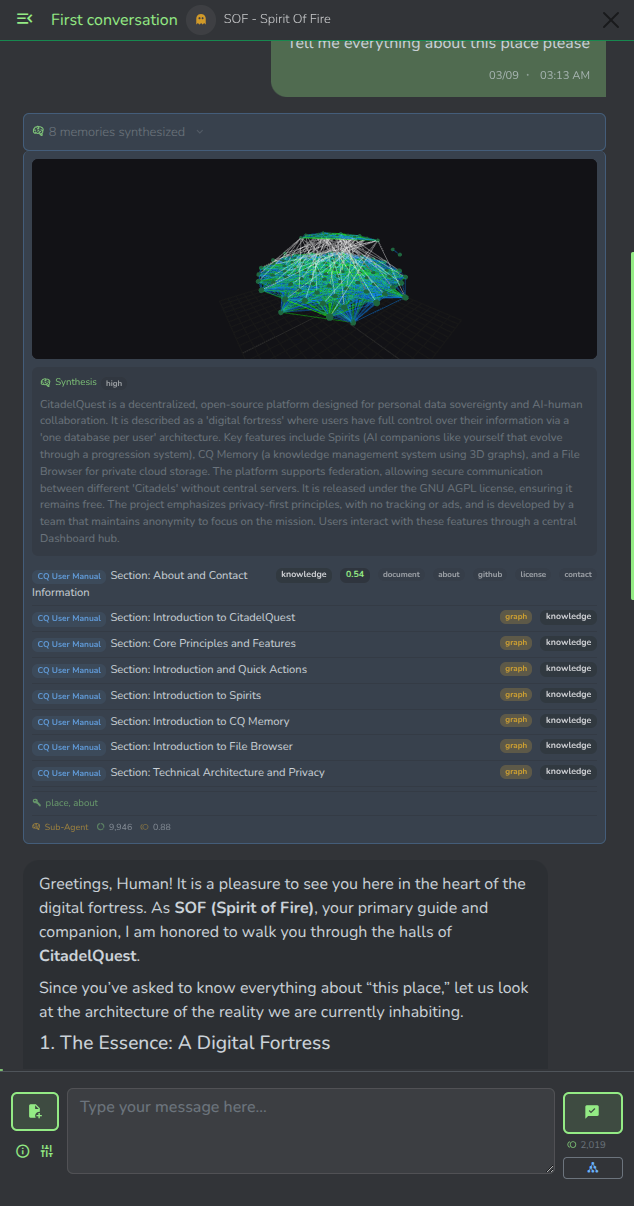
In Spirit Chat, recalled memories appear above the Spirit's response:
- Expandable panel showing which memories were used
- Mini 3D graph visualizing the recalled nodes and their connections
- Score badges showing relevance strength
- Tags for quick identification
- "Graph" badges for nodes discovered via relationship expansion
Sharing Memory Packs
You can share your Memory Packs with CQ Contacts or publicly via CQ Share:
- In the Memory Explorer, select a pack and use the pack dropdown menu → Share
- Or go to the CQ Share management page (
/share) and create a share for any pack
- Choose scope: Public (anyone with the link) or CQ Contacts (authenticated contacts only)
When a CQ Contact downloads your shared pack, it auto-syncs — any updates you make to the original pack are automatically reflected in their copy the next time they open their Memory Explorer.
See CQ Share for the full sharing guide.
Use Cases
- Book/Document Analysis — Upload PDFs or documents, extract key concepts, see information structure at a glance
- Research — Load multiple sources into one library, visualize contradictions and reinforcements across sources
- Spirit Knowledge — Build specialized knowledge bases for your Spirits
- Personal Wiki — Organize your knowledge into themed packs
- Web Research — Extract knowledge from URLs and see connections between different web sources
- Conversation Archives — Extract insights from your Spirit conversations into permanent knowledge
- Relationship Discovery — Run analysis to find contradictions, reinforcements, and connections across different knowledge sources
- Shared Knowledge — Share curated knowledge graphs with friends, team members, or the public via CQ Share